Project Showcase
Particle Studio: from an interactive photo to a motion card worth taking away
Real photo particles, local music, editable projects, and short motion cards in the browser. The product decisions, technical tradeoffs, and verified limits behind Particle Studio V0.1.
What should remain after a photo becomes particles?
Particle Studio began with a simple interaction: turn a photo into particles that can be pushed around. At rest, the subject and original colors should remain recognizable. Holding the pointer should spread the particles gently; releasing it should bring them home with some elasticity.
Once that worked, a more consequential question appeared: why open it again? Rotation, scattering, and a long list of parameters do not automatically create a reason to return.
The project therefore moved toward photo motion cards. A person can supply a photo and a title, choose a complete template, add local music, and export a short introduction, animated cover, or greeting. The interactive workspace remains, but it now has a clearer destination.
That change is still a product hypothesis. V0.1 establishes a working creation and delivery flow. Repeat value will require evidence that people choose their own photos, finish a piece, and return to make another.
Try Particle Studio or read the illustrated Chinese user guide.
Make the photo hold together first
A particle demo can look convincing while an ordinary portrait exposes its problems. Small points leave holes; large points blur eyes and hair. Incorrect color conversion can make skin tones look wrong.
The particle view does not place an intact photo behind the points to hide those gaps. Every point retains a source position, color, and transparency. Black is valid image content; transparency determines which samples are omitted. Interaction, side views, and export therefore use the same real particles.
The default budget is 30,000. Particle count and point size are independent, and coverage was calibrated with an actual portrait. Raising the budget to 80,000 keeps existing particle identities and source positions stable, so selections and protection do not shift randomly.
A larger PNG does not secretly add particles. It exports the current work at a larger resolution, without recovering details already omitted by sampling. Visible edges, gaps, and simplified fine detail remain part of the result that the user can inspect and adjust.
Interaction includes cancellation
Observation is the default tool. Switching to interaction gives an explicit contract: hold to repel or attract, release to return. I wanted a soft, predictable response rather than a photo that continually explodes whenever the pointer passes over it.
Leaving the canvas, cancelling a touch, losing focus, hiding the page, or pausing must also release the force. Returning to the canvas requires another press. A successful normal release is insufficient if interrupted input leaves a force active.
The runtime uses a fixed-step CPU simulation, reusable arrays, and one rendering loop. Per-frame particle positions do not enter React state. This keeps pause, return, and replay controllable while avoiding unnecessary UI work in the simulation path.
Spatial viewing is not a complete 3D person
The initial limited side view did not satisfy the desire to explore the image in 3D space. Observation expanded to orbiting, movement in screen directions, pointer-centered zoom, and a choice between orthographic and perspective projection.
Orthographic viewing is useful for checking the photo: points retain a consistent apparent size. Perspective makes front-to-back relief easier to read. A spatial-view shortcut opens a useful oblique angle, while the front-view control restores angle, zoom, and offset.
Depth still comes from image brightness. Relief, layers, inversion, and smoothing create an artistic surface; they do not determine the actual height of a nose or reconstruct a missing back. A camera that can orbit an image is not the same as a complete 3D portrait model.
Local controls need distinct responsibilities
Keeping a face stable while moving the background requires more than a global strength slider. Selection, protection, and manual depth editing use source-image coordinates, so they follow image content instead of the current camera angle.
Selection controls which particles participate in local effects. Protection reduces motion and morphing. Fully protected particles remain in place during interaction, music-driven movement, and photo-to-text transitions. The depth brush edits shape separately and is not blocked by protection.
That distinction can affect a finished card. A protected face may retain its photo particles when the rest of the image forms a title. The title can therefore be incomplete. A template should not silently erase a user’s mask merely to make its animation look successful.
The depth brush raises, lowers, smooths, or restores an area. A front-facing source view helps place strokes; an oblique particle preview helps judge the result. Orange and blue indicate forward and backward offsets. Individual strokes can be undone, confirmation commits the edit, and cancellation restores the prior viewing state.
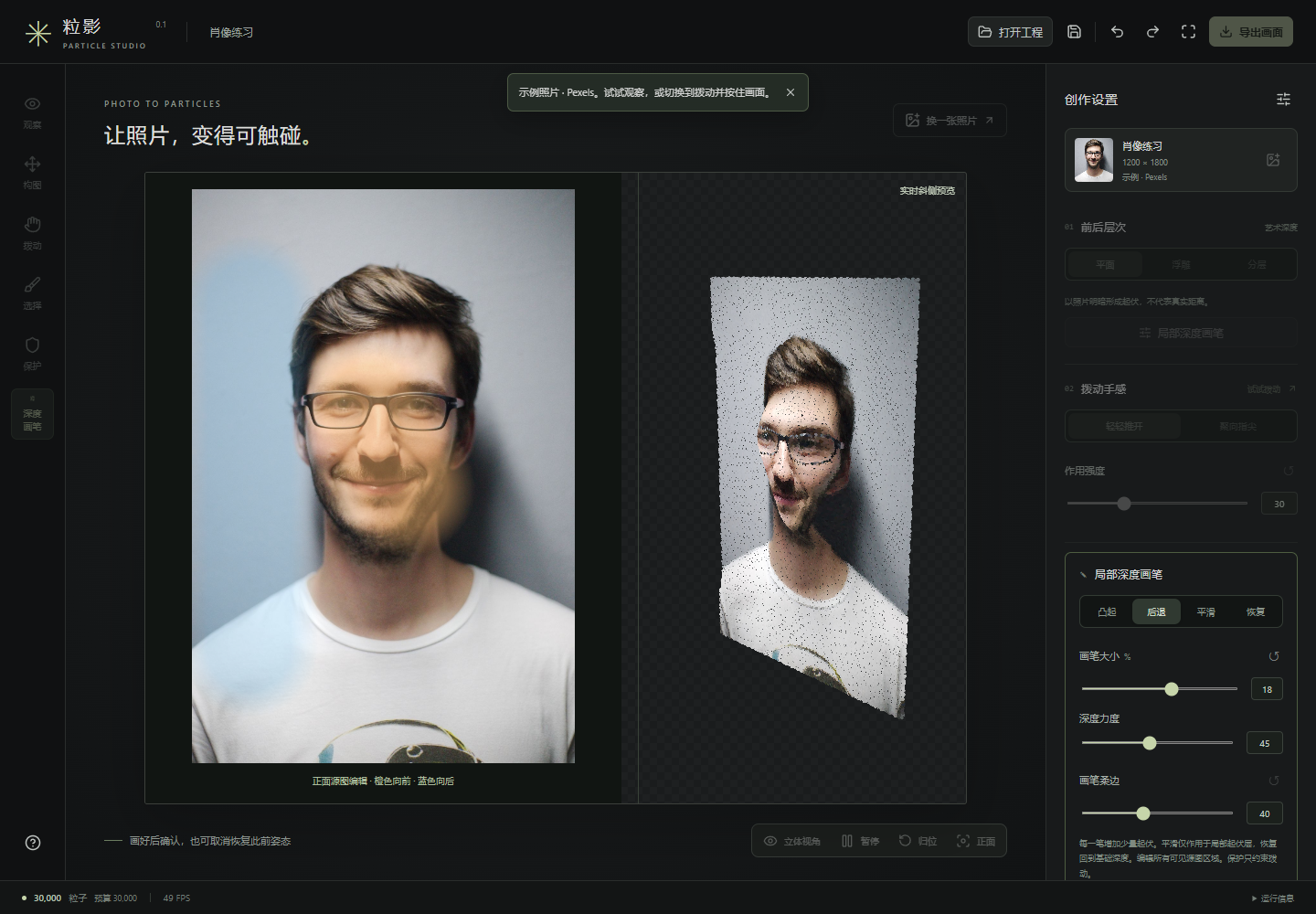
Confirmed manual relief is independent of the brightness layer. Switching between flat and relief modes, changing particle density, or applying an effect preset should not erase previous sculpting. Disabling the layer is temporary; clearing and confirming removes it.
Three templates shorten the route to a finished piece
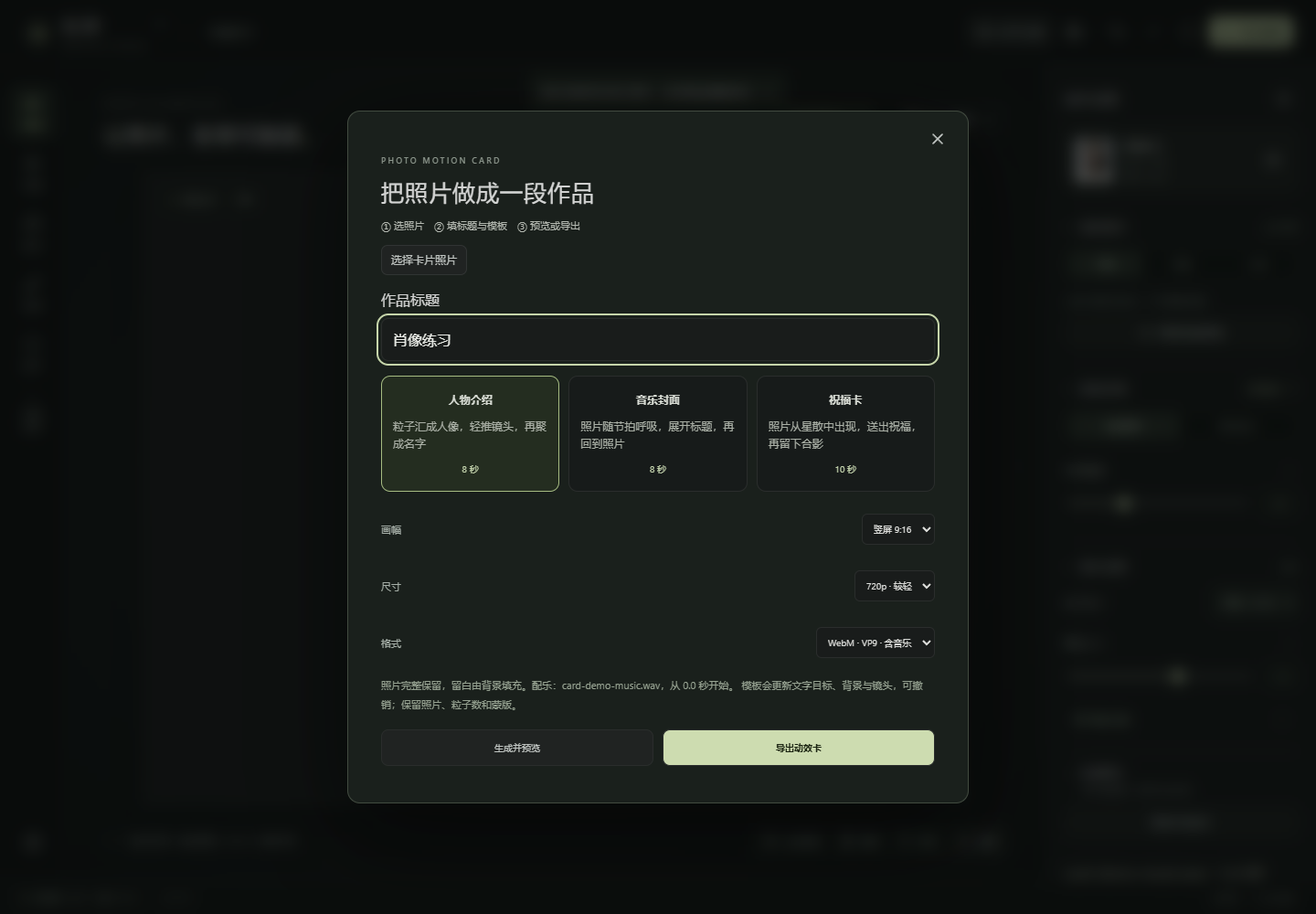
The workspace already supported viewing, interaction, morphing, and recording, but the user still had to arrange an opening, a hold, a transition, and an ending. Motion cards collect those decisions into three fixed templates.
| Template | Length | Sequence |
|---|---|---|
| Portrait introduction | 8 seconds | Particles gather into a portrait, the camera moves gently, then the image forms a title |
| Music cover | 8 seconds | The photo changes into a title and returns, with optional music-driven motion |
| Greeting | 10 seconds | The photo appears, presents a message, then returns for a final hold |
Titles are formed by real particles. The maker asks for a photo, title, template, and output options. It supports previewing or direct export. Export restarts the template from its beginning instead of requiring a carefully timed manual recording.
Portrait, landscape, and square outputs fit the complete source photo, using the background for remaining space. Changing aspect ratio should not remove the top and bottom of a person. Unchanged titles reuse their generated pixels, preserving the font result and avoiding unnecessary undo entries.
These are complete fixed arrangements. They are not yet a general timeline with keyframes, editing tracks, and arbitrary transitions.
Music stays in the browser too
Local music provides a soundtrack and drives subtle spreading and depth waves. Volume and visual intensity are separate; the starting point can be adjusted. Setting volume to zero does not disable the visual response.
Analysis uses actual audio energy rather than a prebuilt looping animation. It does not classify genres or create a professional BPM grid. Input is limited to three minutes and 20 MiB, with decoding support determined by the browser and the file’s encoding.
The project stores a normalized audio copy with up to two channels. This gives reopening and analysis a consistent source, at the cost of a larger project package. Music runs from the chosen start to the end without automatic looping. Any remaining video duration is silent.
With music enabled, export encodes the visual stream and an actual audio track together. Reopening a project is silent until an explicit playback action; hiding the page stops sound. Verification decodes the exported audio rather than assuming a soundtrack exists because preview playback was audible.
A project, an operation recording, and a finished video preserve different things
Saving a project is intended for continued editing. It retains the photo, parameters, masks, depth, and any added targets or music. Temporary particle movement returns to the base shape when the project is reopened.
To preserve a scattered frame, pause and export the current-pose PNG. Static export uses an immutable frame snapshot, so later camera movement or settings cannot alter an export already in progress. A base-shape PNG preserves the settled work instead.
Operation recording stores replayable controls for up to 30 seconds. Changing the source, effects, or music can make an old recording unsuitable, so the app requests a new one. An operation recording is not a movie: it still needs video export before it can be shared with an ordinary player.
Video uses real-time browser capture with supported WebM or MP4 formats, 720p or 1080p, and a solid background. This avoids holding an entire sequence of image frames in memory, but requires a visible page and does not promise offline lossless rendering or perfectly constant encoded frame rates.
Local first includes recovery limits
Image processing, simulation, rendering, audio decoding, saving, and export happen in each user’s browser. Vercel serves the static app and authorized sample. It does not receive user media, render projects remotely, or store cloud projects.
Browser saves use atomic commits with the latest successful version and a few historical checkpoints. Downloading a .particle-project package allows migration. Original files remain untouched; working copies and settings belong to the project.
Storage is isolated by browser and website origin. Switching browsers does not synchronize work, and clearing site data can remove it. Keeping a fixed trial domain and downloading project backups are consequently part of the workflow.
No account reduces the initial barrier, but there is no server-side recovery service. Offline work assumes the app resources have already loaded; a first launch without network access is not yet supported.
Verify more than an attractive demo
Correctness checks cover orientation, proportions, original colors, black and transparent pixels, stable sampling, and projection. Project roundtrips compare actual audio and depth assets. PNG checks inspect alpha values. Recording checks cover real image changes, decoded sound, and resource release after cancellation.
Portrait review separately considers the subject, skin, hair, and point coverage. A color fixture can verify a rule without establishing that a portrait looks good.
At this release, 50 unit tests passed. Chrome and Edge each passed a full 43-case regression, followed by eight final targeted card and music checks in each browser. Cases added later are not described as if they had been part of the earlier full run.
Performance measurements used an RTX 4060 Laptop with the browser’s actual NVIDIA/ANGLE renderer, a 1920×1080 canvas, and DPR 1. A 9.8-second greeting-card scene with stereo music ran at about 59 FPS for both 30k and 80k particles, with a roughly 16.8 ms p95 frame time. These are results for that device and workload.
A separate 80k camera, motion, and morph workload initially ran at about 8 FPS. The hot path repeatedly allocated camera objects and recomputed shapes per particle. Reusing arrays and composing display positions per frame brought the same combination back to about 60 FPS without silently reducing its particle budget.
Touch tests were browser simulations; real phones, Safari, and Firefox remain untested. The initial version’s 20-minute stability run is not counted as a repeated long-duration test of the latest release. Technical acceptance and evidence of user value are separate.
The next question is whether people use it
Adding more effects is not my main objective for the next iteration. More useful questions are whether someone can finish a first piece with their own photo, chooses to export and share it, and later resumes from the project to change a title or soundtrack.
Introductions, greetings, and music covers are starting points. Which one gets reused, and where people stop, should guide whether the next version improves templates, simplifies interaction, or expands the creative tools.
V0.1 connects photo input, interaction, local editing, music, and short-form delivery. The remaining product test is whether that path leaves something a person wants to save, share, and revise.
Screenshots show an authorized sample running in the app. Its source photo is Pexels #220453, used for technical demonstration without implying endorsement. Real user media is not included in this article.